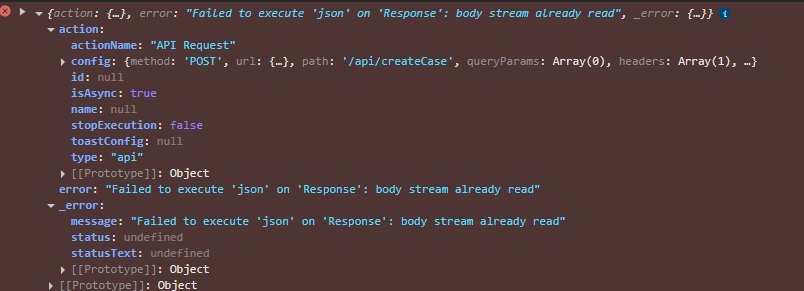
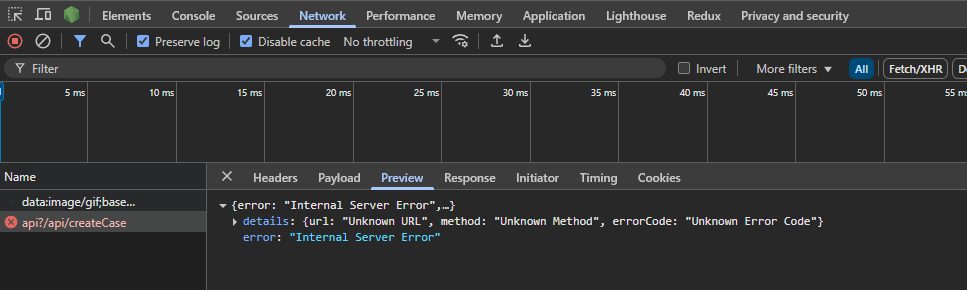

i tried to call an api to ssd from alpha and im getting this error. The request is not getting in the backend im getting this error in the console and network tab.
Hi @Aswin ,
You won’t be able to call your localhost directly from Alpha. You can expose your backend using ngrok (or a similar tunneling tool) and then use that public URL in Alpha.
Thanks
is there any other method to do this. This is for alpha assignment
Once you deploy your backend, you can use that URL. Alternatively, you can use ngrok to expose your local backend.

i have done the ngork tunneling but still im facing the same issue @Shamnad_KS
Please verify your URL and endpoint, and also check the server logs.
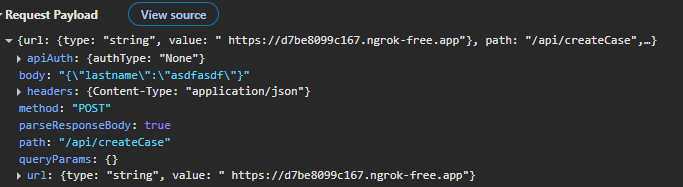
For example, your endpoint should look like: /api/createCase.
I already tried that endpoint and it looks like two api in the url like
/api?/api/createCase this was the endpoint when i checked the network tab thats why i removed the api from the path butt still not working
I tested this api from postman and it was working with postman
the server is not receiving the api call when i checked the logs


Hey @Aswin,
To call create-case please use Triggers section
Hi @Paul_Thomas
before creating case we need to verify whether it is STP or NO STP right so we need to call REELs right so that is why i planned to use SSD. But right now im thinking in different way
instead of calling the ssd i will call REELS direclyt and pass the data for checking STP and NON STP we can call REELS like the triggering case service
and depend on status which we are getting from the REEL we will call the second API which is used to create case in under the same on click
is this a good approach ??
Hi @Aswin ,
Is the api working fine on postman ??
Yess it’s working fine in postman

Yes it was but now i changed
Okay
How many /api did you add ??
Can you share the new configs
I only added one but in the api it shows 2
let me add this again and i will show you the screenshot of the network tab
Hi @Aswin,
The error you encountered:
{
    "error": "Internal Server Error",
    "details": {
        "url": "Unknown URL",
        "method": "Unknown Method",
        "errorCode": "Unknown Error Code"
    }
}
occurred because, after the latest Alpha Studio update, access to third-party API calls was restricted.
To resolve this, we need to whitelist the third-party API URL in the request app. Once it’s whitelisted, you can set the type to ‘Environment’ and follow the same steps as before.
Since you’re currently working on the Alpha masterclass, you can call the SSD API directly from Postman to first check the STP rule, then either create cases or generate a policy based on the STP output. After that, you can proceed with the rest of the masterclass as usual.