Introduction
Automation is transforming the insurance industry, making seamless and error-free claims processing a necessity. Straight-Through Processing (STP) is a key driver of intelligent automation, eliminating manual interventions and ensuring faster, more accurate decision-making in policy administration, claims handling, and benefit payouts.
By implementing well-structured STP rules, insurers can:
 Improve operational efficiency in policy and claims processing
Reduce turnaround time for benefit calculations and approvals
Minimize errors and inconsistencies in underwriting and payouts
Enhance customer experience with faster, automated decision-making
With Neutrinos Reels, a no-code rules management system, insurance providers can configure and scale automation workflows without extensive coding. This empowers both business users and IT teams to adapt to regulatory changes, streamline claims processing, and drive digital transformation at a rapid pace.
In this post, we explore best practices for STP rule implementation in insurance, using Botswana Post’s Cashback Benefit Calculation Rule as a real-world example of how automation enhances policyholder benefits.
Understanding the Cashback Benefit Rule
The Cashback Benefit Rule is designed to pay a lump sum benefit equivalent to six premiums every 36 months—provided the policy remains active without restarts. However, two primary conditions must be met:
-
Policy Age Check: The policy must have remained in force for 36 months without restarts.
-
Policy Coverage Check: The cashback benefit is applicable only on plans with parent cover.
These conditions ensure that only eligible policies benefit from the cashback feature while maintaining the integrity of the STP system.

Additionally, failure to meet either of these conditions results in an automatic disqualification from the cashback benefit.
Establish a framework for Reason Codes
To ensure consistency and transparency in rule execution, ReasonCodes should be structured using the following format:
<CATEGORY>_<TYPE>_<CONTEXT>_<ID>
This approach helps categorize rule failures and improves auditability.
 Category: Defines the Primary Issue Area
 Category: Defines the Primary Issue Area
| Category | Description |
|---|---|
| POL | Policy-related issues (e.g., eligibility, coverage) |
| CLM | Claim-related issues (e.g., claim status, coverage) |
| DOC | Document-related issues (e.g., missing documents, verification) |
| VAL | Validation issues (e.g., missing or invalid data) |
| FRD | Fraud-related issues (e.g., suspected fraud) |
| BNFT | Benefit-related issues (e.g., eligibility for specific benefits) |
 Type: Categorizes the Nature of the Issue
 Type: Categorizes the Nature of the Issue
| Type | Description |
|---|---|
| ELIG | Eligibility-related issues (e.g., policy eligibility, age eligibility) |
| COV | Coverage-related issues (e.g., benefit coverage, exclusions) |
| WAIT | Waiting period-related issues (e.g., waiting period not satisfied) |
| EXCL | Exclusion-related issues (e.g., pre-existing conditions, coverage exclusions) |
| LSUM | Lump-sum benefit-related issues (e.g., lumpsum eligibility) |
| VERIF | Verification issues (e.g., identity verification) |
| MAX | Maximum benefit limit reached (e.g., policy benefit limits) |
| MIN | Minimum eligibility or age requirements |
| FRAUD | Fraud-related rejections (e.g., suspected fraud) |
 Context: Defines the Specific Rule Condition
 Context: Defines the Specific Rule Condition
| Context | Description |
|---|---|
| AGE | Age-related eligibility (e.g., minimum or maximum age requirements) |
| PREM | Premium-related issues (e.g., premium payment status) |
| RESTART | Restart-related issues (e.g., policy restarts) |
| WAIT | Waiting period conditions (e.g., waiting period for claims) |
| TYPE | Policy type-related (e.g., parent cover, policy benefit types) |
| LAPSE | Lapse in policy coverage (e.g., policy lapse) |
| DURATION | Duration of policy in-force (e.g., minimum months required) |
| COVER | Coverage-related restrictions (e.g., covered or not covered under a plan) |
| PLAN | Plan type-related issues (e.g., policy with parent cover) |
| LIMIT | Benefit limit-related issues (e.g., exceeded maximum claim limit) |
 Example Reason Codes for Cashback Benefit Rule
 Example Reason Codes for Cashback Benefit Rule
| ReasonCode | Description |
|---|---|
| POL_COV_TYPE_001 | Policy doesn’t have a parent cover. |
| POL_ELIG_AGE_001 | Policy must be in force for 36 months without any restarts. |
These ReasonCodes can be mapped to UI messages, such as snackbar notifications or rule execution logs, providing clear feedback to the user.
 Audit & Dashboard Integration
Tracking these ReasonCodes in an NSTP queue and displaying them on dashboards improves claim processing visibility and compliance monitoring.
Exception Handling in Reels
Effective exception handling is crucial in rule automation to prevent processing errors and data inconsistencies. When a rule fails due to unmet conditions, the following best practices should be followed:
Best Practices for Exception Handling
Use Scripts to Set Rule Outputs
If a rule exits through a fatal route, unassigned outputs must be explicitly set to prevent blank values.
Standardized Messaging
Assign clear ReasonCodes to improve auditability and debugging.
Testing for Non-Empty Values
Ensure that all output fields contain values during testing to avoid execution failures.
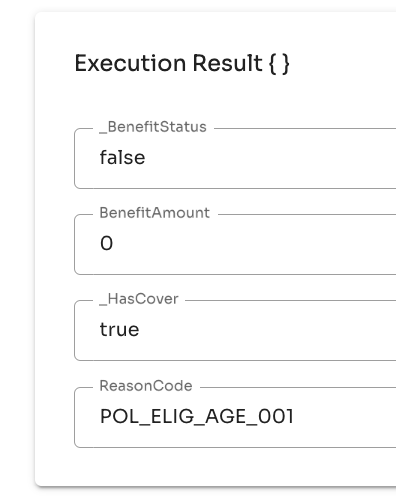
Example: No Cashback Exception Handling

If a policy does not meet the 36-month eligibility requirement:
- BenefitAmount is set to
0 - ReasonCode is assigned as
POL_ELIG_AGE_001
This prevents incomplete data from being processed incorrectly.
Design & Naming Conventions

Adhering to standardized naming conventions enhances clarity and maintainability when defining rules, workflows, and variables. Below is the recommended approach for structuring inputs, outputs, and workflows in Neutrinos Reels.
Input & Output Naming Conventions
| Inputs | Outputs |
|---|---|
PolicyAge |
_BenefitStatus |
Premium |
BenefitAmount |
Policy |
_HasCover |
CoverName |
ReasonCode |
 PascalCase for field names in the Input/Output Model.
Prefix _ for intermediary and private fields.
Naming Rules & Workflows
Use Title Case for rule names within a workflow/group.
Format for naming workflows, groups, and rules:
<BroadCategory>-<RuleName>
Example:
Claims-EligibilityCheckBenefits-CashbackValidation
Conditional Branch Naming:
- Yes path →
isTrue - No path →
isFalse
Workflow Visual Preferences
 Square vs. Curved Paths: Square paths are used in this implementation, but curved links are preferred when possible for better readability.
Color Tagging for Clarity: Use consistent colors to visually group similar rule blocks and improve diagram interpretation.
Key Takeaways for Implementing STP Rules
Ensure policies meet all eligibility criteria before execution.
Implement structured exception handling to prevent data inconsistencies.
Follow a standardized naming convention for clarity and maintainability.
Use Reason Codes to provide actionable feedback and improve audit trails.
Conclusion
By leveraging the powerful rule management capabilities of Neutrinos Reels, businesses can optimize STP automation for accuracy, efficiency, and compliance. Applying these best practices ensures seamless processing and enhances decision-making in automated workflows.
 Have you implemented STP rules on the Neutrinos platform?
 Have you implemented STP rules on the Neutrinos platform?
Share your insights and experiences in the comments below!