# Neutrinos Studio is not opening or working on my Ubuntu system
**URL:** https://community.neutrinos.com/t/neutrinos-studio-is-not-opening-or-working-on-my-ubuntu-system/452
**Category:** Training, Academy & Certifications
**Tags:** neutrinos-ssd
**Created:** [February 26, 2025, 5:31am UTC](https://community.neutrinos.com/t/neutrinos-studio-is-not-opening-or-working-on-my-ubuntu-system/452 "2025-02-26T05:31:59Z")
**Posts on this page:** 20
**Page:** 1
### Author:  [@dhishon](https://community.neutrinos.com/u/dhishon)
#### Post date: [February 26, 2025, 5:31am UTC](https://community.neutrinos.com/t/neutrinos-studio-is-not-opening-or-working-on-my-ubuntu-system/452/1 "2025-02-26T05:31:59Z")
I had installed the desktop app , but when i try to open it is not opening. i had tried many times but not working.
---
### Author:  [@ragesh-a](https://community.neutrinos.com/u/ragesh-a)
#### Post date: [February 26, 2025, 5:48am UTC](https://community.neutrinos.com/t/neutrinos-studio-is-not-opening-or-working-on-my-ubuntu-system/452/2 "2025-02-26T05:48:28Z")
@dhishon
Could you please provide more information about the issue? Are you seeing any specific error messages on the screen when you try to open the app?
---
### Author:  [@dhishon](https://community.neutrinos.com/u/dhishon)
#### Post date: [February 26, 2025, 10:16am UTC](https://community.neutrinos.com/t/neutrinos-studio-is-not-opening-or-working-on-my-ubuntu-system/452/3 "2025-02-26T10:16:34Z")
There is no specific error message. I am using Ubuntu, and when I double-click on Neutrinos Studio, nothing opens. When I click multiple times (show only sometimes), Ubuntu displays a “Not Responding” message and prompts me to send a report.
---
### Author:  [@ragesh-a](https://community.neutrinos.com/u/ragesh-a)
#### Post date: [February 26, 2025, 11:05am UTC](https://community.neutrinos.com/t/neutrinos-studio-is-not-opening-or-working-on-my-ubuntu-system/452/4 "2025-02-26T11:05:12Z")
Could you please specify:
1. Your Ubuntu version.
2. Your Node.js version
Additionally, I recommend deleting the `.neutrinos` folder under your home directory. Keep in mind that this folder is hidden by default, so you might need to enable hidden files to see it
---
### Author:  [@dhishon](https://community.neutrinos.com/u/dhishon)
#### Post date: [February 26, 2025, 11:28am UTC](https://community.neutrinos.com/t/neutrinos-studio-is-not-opening-or-working-on-my-ubuntu-system/452/5 "2025-02-26T11:28:00Z")
Ubuntu VERSION="24.04.2 LTS
Node Version v20.18.0
Also i had deleted the .neutrinos folder .
---
### Author:  [@Eldho](https://community.neutrinos.com/u/Eldho)
#### Post date: [February 27, 2025, 6:55am UTC](https://community.neutrinos.com/t/neutrinos-studio-is-not-opening-or-working-on-my-ubuntu-system/452/6 "2025-02-27T06:55:03Z")
@ragesh-a please help
---
### Author:  [@ragesh-a](https://community.neutrinos.com/u/ragesh-a)
#### Post date: [February 27, 2025, 7:10am UTC](https://community.neutrinos.com/t/neutrinos-studio-is-not-opening-or-working-on-my-ubuntu-system/452/7 "2025-02-27T07:10:51Z")
It looks like your desktop app is being blocked due to **security restrictions** in **Ubuntu 24.04** , likely caused by **user namespace restrictions** or **AppArmor policies**.
### 🔹 **Temporary Fix**
Run the following command in the terminal:
```auto
sudo sysctl -w kernel.apparmor_restrict_unprivileged_userns=0
```
Then, launch the app using:
```auto
n-studio
```
### 🔹 **Alternative Solution**
If the issue persists, consider downgrading to **Ubuntu 22.04** , where the app works without issues.
---
### Author:  [@dhishon](https://community.neutrinos.com/u/dhishon)
#### Post date: [February 27, 2025, 8:03am UTC](https://community.neutrinos.com/t/neutrinos-studio-is-not-opening-or-working-on-my-ubuntu-system/452/8 "2025-02-27T08:03:01Z")
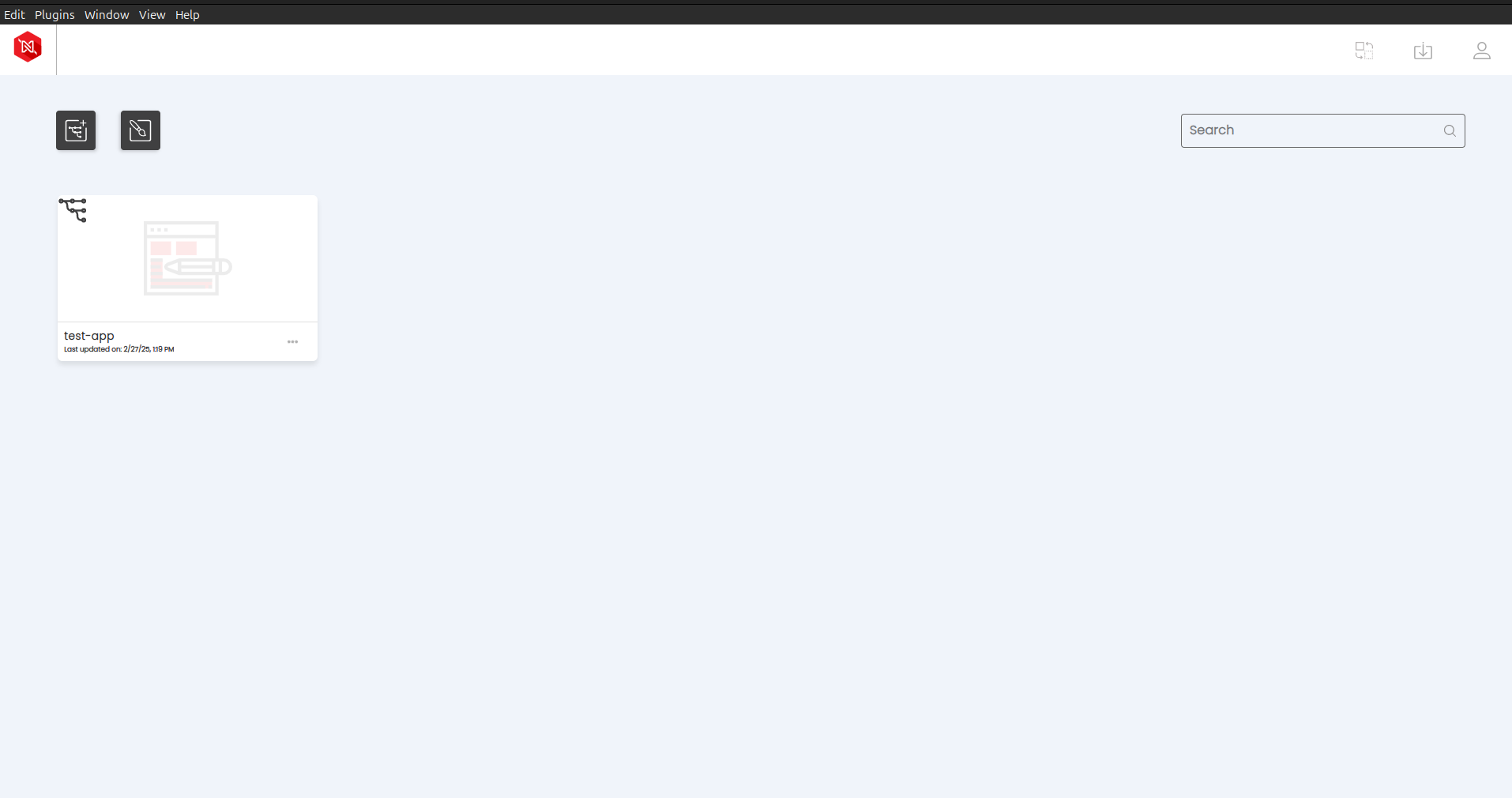
Okay, I ran the above commands, and at that time, it showed an NVM error stating that I needed to downgrade to version 10 or below. I did that, and it opened, but only in the terminal. So, I have to run `n-studio` manually every time. When I try to open it using the GUI, it doesn’t work and still shows the NVM error.
Additionally, when I run it in the terminal, it displays the following output
terminal:~$ n-studio
13:20:12.754 › Passed CLI Args {}
13:20:12.769 › magnetLinkGetter::skipping:: /opt/Neutrinos Studio/n-studio
13:20:12.849 › app ready…
[22316:0227/132012.933826:ERROR:sandbox\_linux.cc(377)] InitializeSandbox() called with multiple threads in process gpu-process.
13:20:13.055 › result Settings: {
studioVersion: ‘9.3.0’,
uuid: ‘b0f00ea0-2d03-60ef-9613-e7ffe8c1f335’,
reInstallTemplate: false,
urls: {
applicationCentreUrl: ‘[https://console.neutrinos.co/api/](https://console.neutrinos.co/api/)’,
docsBaseUrl: ‘[https://documentation.neutrinos.com/](https://documentation.neutrinos.com/)’,
storeWebUrl: ‘[https://store.neutrinos.co](https://store.neutrinos.co)’,
consoleWebUrl: ‘[https://console.neutrinos.co](https://console.neutrinos.co)’,
registryUrl: ‘[Repository - Sonatype Nexus Repository](https://nexus.neutrinos.co/repository/neutrinos-store-registry/)’,
marketplaceUrl: ‘[https://store.neutrinos.co/api/9.3.0/](https://store.neutrinos.co/api/9.3.0/)’
},
ports: { coreServerPort: 24484, coreStartRange: 24484, coreEndRange: 24493 },
log: { file: ‘error’, console: ‘info’ },
enableOCD: false,
ids: {
oidc\_config: {
OIDC\_ISSUER: ‘[https://ids.neutrinos.co](https://ids.neutrinos.co)’,
CLIENT\_ID: ‘neutrinos-studio’,
CLIENT\_SECRET: ‘client-secret-key’,
CLOCK\_TOLERANCE: 60
},
http\_options: {
followRedirect: true,
headers: ‘[object]’,
retries: 3,
timeout: 60000
}
},
captureAnalytics: true,
analytics: {
mqHost: ‘[analyticsq.neutrinos.co](http://analyticsq.neutrinos.co)’,
mqPort: ‘5672’,
producerQ: ‘nstudio’,
AnalyticsFirstInterval: 1800000,
AnalyticsCallInterval: 10800000
}
}
(node:22272) DeprecationWarning: file property is deprecated and will be removed in v5.
(Use `n-studio --trace-deprecation ...` to show where the warning was created)
13:20:15.784 › core server started…checking env
13:20:15.921 › envResult {“httpStatus”:200,“data”:{“errorMsg”:“”,“envMatchFlag”:true}}
13:20:15.922 › Environment details: { errorMsg: ‘’, envMatchFlag: true }
13:20:15.940 › Main electron window loaded
[22316:0227/132017.097875:ERROR:gl\_surface\_presentation\_helper.cc(260)] GetVSyncParametersIfAvailable() failed for 1 times!
[22316:0227/132017.134655:ERROR:gl\_surface\_presentation\_helper.cc(260)] GetVSyncParametersIfAvailable() failed for 2 times!
[22316:0227/132017.145267:ERROR:gl\_surface\_presentation\_helper.cc(260)] GetVSyncParametersIfAvailable() failed for 3 times!
13:20:26.278 › Launching angular app!
13:20:26.522 › Created Terminal with pid: 22431
13:20:28.327 › {
process: ‘CORE’,
error: “Error: RPError: sub mismatch, expected { accountId: ‘dhishonthomas23@gmail.com’, strategy: ‘neutrinos’ }, got: { accountId: ‘dhishonthomas23@gmail.com’, strategy: ‘neutrinos’ }\n” +
’ at AuthenticationService.getNewTokenset (/opt/Neutrinos Studio/resources/app.asar/node\_modules/@jatahworx/bhive-core/core/services/AuthenticationService.js:183:19)’
}
13:20:28.329 › Error: RPError: sub mismatch, expected { accountId: ‘dhishonthomas23@gmail.com’, strategy: ‘neutrinos’ }, got: { accountId: ‘dhishonthomas23@gmail.com’, strategy: ‘neutrinos’ }
at AuthenticationService.getNewTokenset (/opt/Neutrinos Studio/resources/app.asar/node\_modules/@jatahworx/bhive-core/core/services/AuthenticationService.js:183:19)
13:20:31.698 › TERM\_KILL\_ALL for pid: 22431
Based on the logs I provided, it seems to work manually via the terminal, but the GUI method is not functioning
---
### Author:  [@ragesh-a](https://community.neutrinos.com/u/ragesh-a)
#### Post date: [February 27, 2025, 9:53am UTC](https://community.neutrinos.com/t/neutrinos-studio-is-not-opening-or-working-on-my-ubuntu-system/452/9 "2025-02-27T09:53:12Z")
> [@dhishon](#):
>
> , it doesn’t work and still shows the NVM error.
what NVM error are you getting?
---
### Author:  [@dhishon](https://community.neutrinos.com/u/dhishon)
#### Post date: [February 27, 2025, 1:05pm UTC](https://community.neutrinos.com/t/neutrinos-studio-is-not-opening-or-working-on-my-ubuntu-system/452/10 "2025-02-27T13:05:14Z")
> **[neutrinos.mkv](https://drive.google.com/file/d/13-M150_XQqHMEzRNyqYh7ynduWf0bdUf/view?usp=sharing)**
>
> Google Drive file.
---
### Author:  [@shiv](https://community.neutrinos.com/u/shiv)
#### Post date: [February 28, 2025, 4:50pm UTC](https://community.neutrinos.com/t/neutrinos-studio-is-not-opening-or-working-on-my-ubuntu-system/452/11 "2025-02-28T16:50:56Z")
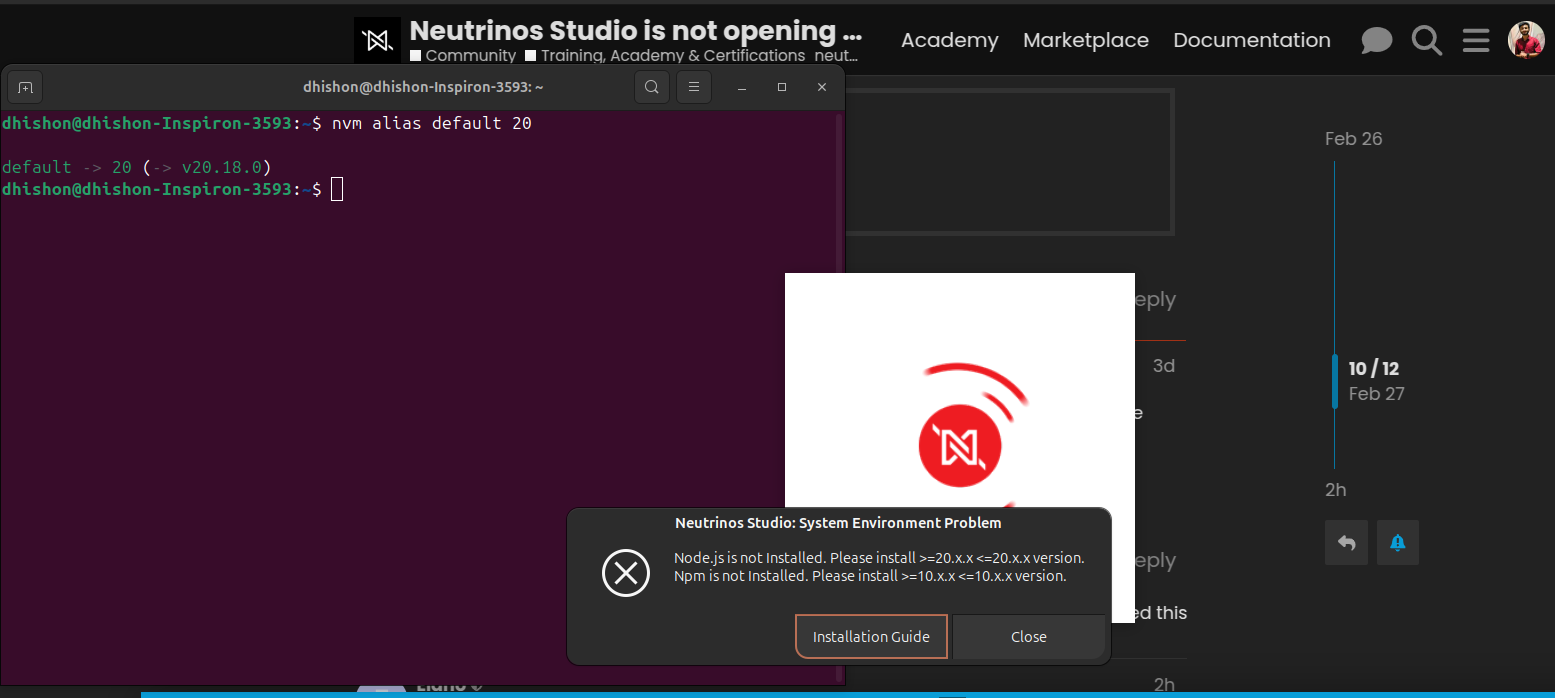
You’ll need to run the following command to set the default version for node on the system so that the application can start.
`nvm alias default 20`
---
### Author:  [@Eldho](https://community.neutrinos.com/u/Eldho)
#### Post date: [March 3, 2025, 12:20pm UTC](https://community.neutrinos.com/t/neutrinos-studio-is-not-opening-or-working-on-my-ubuntu-system/452/12 "2025-03-03T12:20:24Z")
@arane please have a look at this
---
### Author:  [@dhishon](https://community.neutrinos.com/u/dhishon)
#### Post date: [March 3, 2025, 2:35pm UTC](https://community.neutrinos.com/t/neutrinos-studio-is-not-opening-or-working-on-my-ubuntu-system/452/13 "2025-03-03T14:35:27Z")
I had tried .. but same issue.
---
### Author:  [@Eldho](https://community.neutrinos.com/u/Eldho)
#### Post date: [March 4, 2025, 6:04am UTC](https://community.neutrinos.com/t/neutrinos-studio-is-not-opening-or-working-on-my-ubuntu-system/452/14 "2025-03-04T06:04:23Z")
@ragesh-a please take look and provide the assistance
---
### Author:  [@ragesh-a](https://community.neutrinos.com/u/ragesh-a)
#### Post date: [March 4, 2025, 6:17am UTC](https://community.neutrinos.com/t/neutrinos-studio-is-not-opening-or-working-on-my-ubuntu-system/452/15 "2025-03-04T06:17:45Z")
Ensure that you are using Node version 20. If you have installed Node using NVM (Node Version Manager), make sure that the Node version persists across all terminal tabs.
---
### Author:  [@ragesh-a](https://community.neutrinos.com/u/ragesh-a)
#### Post date: [March 5, 2025, 11:51am UTC](https://community.neutrinos.com/t/neutrinos-studio-is-not-opening-or-working-on-my-ubuntu-system/452/16 "2025-03-05T11:51:58Z")
> [@dhishon](#):
>
> Based on the logs I provided, it seems to work manually via the terminal, but the GUI method is not functioning
Could you please delete this log from the chat.
---
### Author:  [@hoangvdh](https://community.neutrinos.com/u/hoangvdh)
#### Post date: [November 28, 2025, 10:32am UTC](https://community.neutrinos.com/t/neutrinos-studio-is-not-opening-or-working-on-my-ubuntu-system/452/17 "2025-11-28T10:32:38Z")
Hi @dhishon ,
Was this issue resolved?
---
### Author:  [@hoangvdh](https://community.neutrinos.com/u/hoangvdh)
#### Post date: [November 28, 2025, 10:33am UTC](https://community.neutrinos.com/t/neutrinos-studio-is-not-opening-or-working-on-my-ubuntu-system/452/18 "2025-11-28T10:33:19Z")
Hi @ragesh-a
I faced the same issue for ubuntu 22.04
---
### Author:  [@Eldho](https://community.neutrinos.com/u/Eldho)
#### Post date: [November 28, 2025, 10:37am UTC](https://community.neutrinos.com/t/neutrinos-studio-is-not-opening-or-working-on-my-ubuntu-system/452/19 "2025-11-28T10:37:42Z")
@ragesh-a Can you please support?
---
### Author:  [@Sam](https://community.neutrinos.com/u/Sam)
#### Post date: [November 28, 2025, 10:50am UTC](https://community.neutrinos.com/t/neutrinos-studio-is-not-opening-or-working-on-my-ubuntu-system/452/20 "2025-11-28T10:50:09Z")
Hello @hoangvdh ,
**Did you try the steps I mentioned earlier?
You can also try another workaround:**
Please go to the **.neutrinos** folder and open the **settings.json** file.
Inside it, you will find the **clockTolerance** value.
Kindly update it from **60** to **90** , save the file, and try again.
[Next page](https://community.neutrinos.com/t/neutrinos-studio-is-not-opening-or-working-on-my-ubuntu-system/452.md?page=2)