# How to Implement Branching Conditions in Neutrinos Reels to Stop Subsequent Execution if Conditions Are Not Met
**URL:** https://community.neutrinos.com/t/how-to-implement-branching-conditions-in-neutrinos-reels-to-stop-subsequent-execution-if-conditions-are-not-met/205
**Category:** Training, Academy & Certifications
**Tags:** neutrinos-reels, cohort-1-nov-2024
**Created:** [December 6, 2024, 9:51am UTC](https://community.neutrinos.com/t/how-to-implement-branching-conditions-in-neutrinos-reels-to-stop-subsequent-execution-if-conditions-are-not-met/205 "2024-12-06T09:51:43Z")
**Posts on this page:** 7
**Page:** 1
### Author:  [@neethu.sa](https://community.neutrinos.com/u/neethu.sa)
#### Post date: [December 6, 2024, 9:51am UTC](https://community.neutrinos.com/t/how-to-implement-branching-conditions-in-neutrinos-reels-to-stop-subsequent-execution-if-conditions-are-not-met/205/1 "2024-12-06T09:51:43Z")
Hi Neutrinos Community,
I’m working with Neutrinos Reels and need help with implementing branching logic within my workflow. Specifically, I want to evaluate certain conditions, and if they are not met, I need to stop the subsequent execution of the workflow. Is there a way to set up branching conditions and halt the workflow if the conditions are not satisfied?
---
### Author:  [@Muhammed\_Sinan](https://community.neutrinos.com/u/Muhammed_Sinan)
#### Post date: [December 6, 2024, 10:07am UTC](https://community.neutrinos.com/t/how-to-implement-branching-conditions-in-neutrinos-reels-to-stop-subsequent-execution-if-conditions-are-not-met/205/2 "2024-12-06T10:07:56Z")
You can add a condition by double-clicking on an edge (connector link). Provide a name for the condition to easily identify it, select the operands and operator based on your requirements, and save the condition. Finally, save the workflow to deploy the changes.
---
### Author:  [@neethu.sa](https://community.neutrinos.com/u/neethu.sa)
#### Post date: [December 6, 2024, 10:24am UTC](https://community.neutrinos.com/t/how-to-implement-branching-conditions-in-neutrinos-reels-to-stop-subsequent-execution-if-conditions-are-not-met/205/3 "2024-12-06T10:24:52Z")
I tried adding a condition by double-clicking on the edge (connector link), providing a name, selecting the operands and operator, and saving the condition. While this successfully evaluates the condition, if it’s not satisfied, it only skips the very next rule in the workflow and continues executing the others.
My requirement is to completely stop the execution of the subsequent rules if the condition is not met. Is there a way to achieve this?
---
### Author:  [@Muhammed\_Sinan](https://community.neutrinos.com/u/Muhammed_Sinan)
#### Post date: [December 6, 2024, 10:26am UTC](https://community.neutrinos.com/t/how-to-implement-branching-conditions-in-neutrinos-reels-to-stop-subsequent-execution-if-conditions-are-not-met/205/4 "2024-12-06T10:26:31Z")
Please share a screenshot of you flow
---
### Author:  [@neethu.sa](https://community.neutrinos.com/u/neethu.sa)
#### Post date: [December 6, 2024, 10:30am UTC](https://community.neutrinos.com/t/how-to-implement-branching-conditions-in-neutrinos-reels-to-stop-subsequent-execution-if-conditions-are-not-met/205/5 "2024-12-06T10:30:09Z")
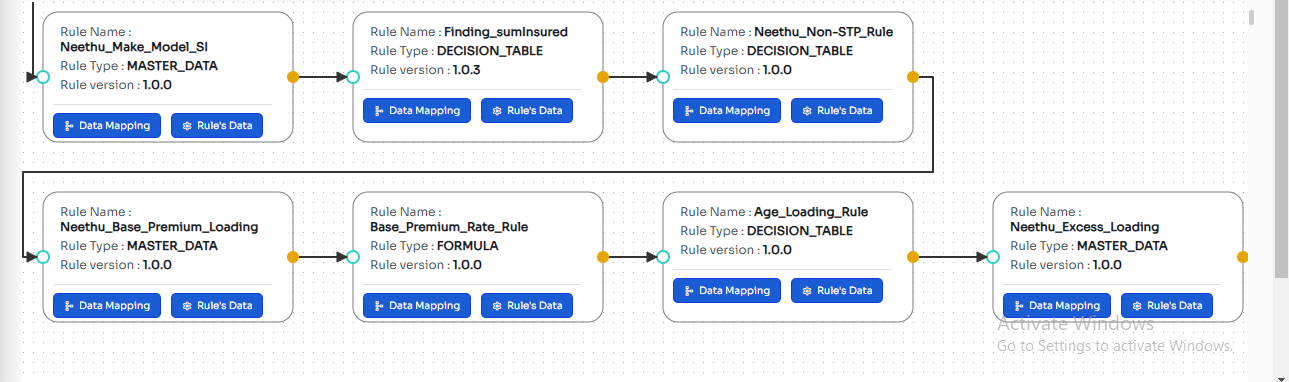
If the condition evaluates to STP, I want to completely stop the subsequent execution of the workflow, particularly for determining the premium.
---
### Author:  [@Muhammed\_Sinan](https://community.neutrinos.com/u/Muhammed_Sinan)
#### Post date: [December 6, 2024, 11:21am UTC](https://community.neutrinos.com/t/how-to-implement-branching-conditions-in-neutrinos-reels-to-stop-subsequent-execution-if-conditions-are-not-met/205/6 "2024-12-06T11:21:09Z")
Please share the workflow which includes the condition.
---
### Author:  [@neethu.sa](https://community.neutrinos.com/u/neethu.sa)
#### Post date: [December 6, 2024, 11:51am UTC](https://community.neutrinos.com/t/how-to-implement-branching-conditions-in-neutrinos-reels-to-stop-subsequent-execution-if-conditions-are-not-met/205/7 "2024-12-06T11:51:12Z")
I resolved the issue by separating the rules. I created individual rules for the knockout conditions and non-STP conditions first. Then, I consolidated all condition checks into a single rule. Finally, I placed this Premium Eligibility Check rule immediately before the premium calculation step. This allowed me to implement the branching condition successfully and stop subsequent execution when necessary.